
Before We Start
So, you have finally decided to buy BioShock 2 on Steam. Let's set up a few things before launching BioShock 2 Multiplayer for the first time.
General Properties
- Open up your Steam Library.
- Right-click BioShock 2, then select "Properties...".
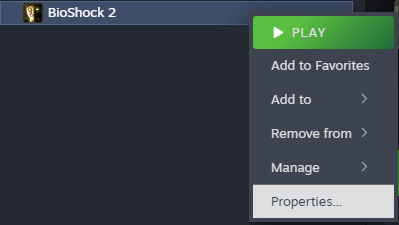
- This will open up the "Properties" panel and put you in the "General" tab by default. Here you will see various options for modifying the game.
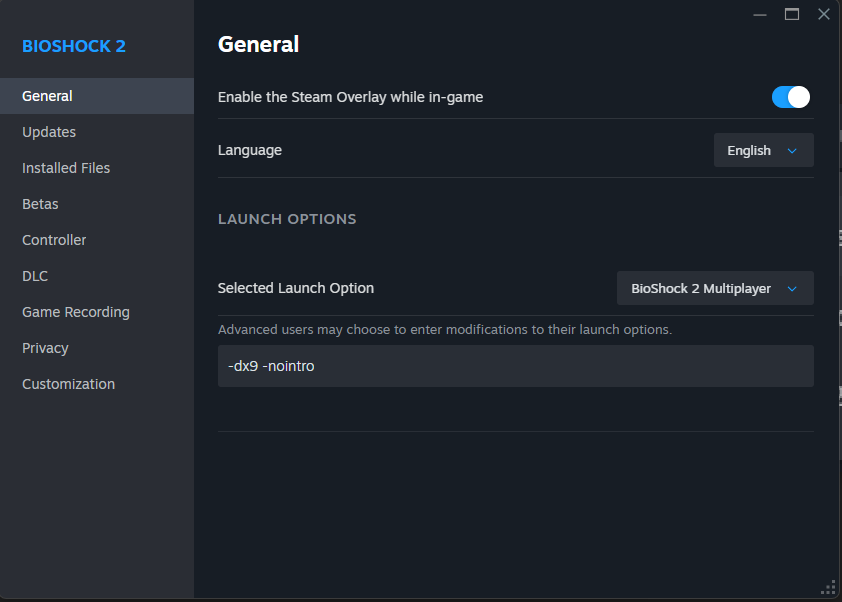
Steam Overlay
You can choose whether or not to use the Steam Overlay in game.
⚠️ Warning
When using DirectX 10 (dx10), the Steam Overlay is invisible. Once it is opened, the player will be stuck in the Steam Overlay until they press ESC to close it.
Language
This lets the player choose which language the game will run in. The following languages are officially supported:
- English
- Français (French)
- Español – España (Spanish – Spain)
- Deutsch (German)
- Italiano (Italian)
📝 Note
When a new language is chosen, the player will be required to download and update their files.
Launch Options
There are a few additional options to modify how BioShock 2 launches and behaves.
Selected Launch Options
This lets the player choose which version of BioShock 2 to start automatically.
- Ask when starting game - Asks to open either the singleplayer or multiplayer on every launch.
- Play BioShock 2 - Opens the singleplayer as the default launch option.
- BioShock 2 Multiplayer - Opens the multiplayer as the default launch option.
Command-Line Arguments
These commands can be entered into the box at the bottom of the "General" tab. Below are some valid command-line arguments to choose from.
| Command-Line Argument | Description |
|---|---|
-dx9 | Sets the Direct X graphics driver version to DirectX 9. |
-dx10 | Sets the Direct X graphics driver version to DirectX 10. |
-nointro | Skips the intro movies and credits and goes to Main Menu. |
📝 Note
Arguments always start with "-" and must be seperated by a space.
Example Arguments
-dx9 -nointroWhat DirectX Version to Choose?
ℹ️ Player's Choice
It is up to the player to determine which version of DirectX to use. However, the majority of players use DirectX 9 (dx9) as their version to avoid crashes and fix the Steam Overlay.